

Description
GoldT WebMCP Bridge enables AI agents to interact with your WordPress content through secure OAuth 2.0 authentication using the WebMCP protocol.
Perfect for AI-powered customer support, automated content analysis, intelligent search, and custom AI integrations.
✨ Features
- WebMCP Protocol Support – Industry-standard AI integration
- Secure OAuth 2.0 – Same security standard as Google, Facebook, GitHub – your passwords stay safe
- 8 Pre-registered AI Clients – Claude, ChatGPT, Gemini, Grok, Perplexity, Copilot, Meta AI, DeepSeek
- 7 Tools – WordPress content tools plus optional translation via MyMemory API
- Translation Provider – Choose AI self-translate, MyMemory API, or disabled
- Dynamic Manifest – Instructions adapt to your settings so AI agents don’t invent capabilities
- Rate Limiting – Prevent abuse (50 req/min default)
- Security Controls – Token management, block specific users
- Zero Configuration – Works out of the box
- Extensible – Add custom tools via developer hooks
🎯 Quick Start for AI Users
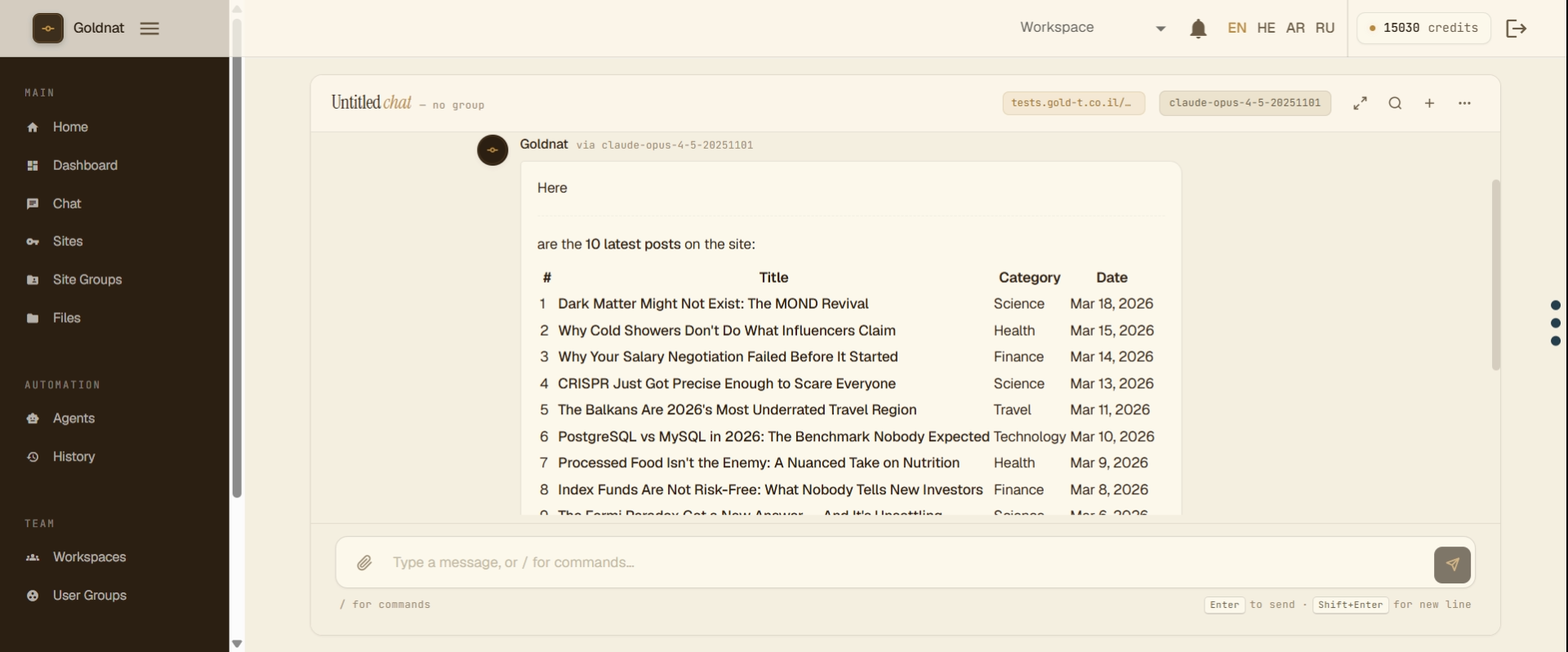
Using ChatGPT or Claude?
Tell your AI agent:
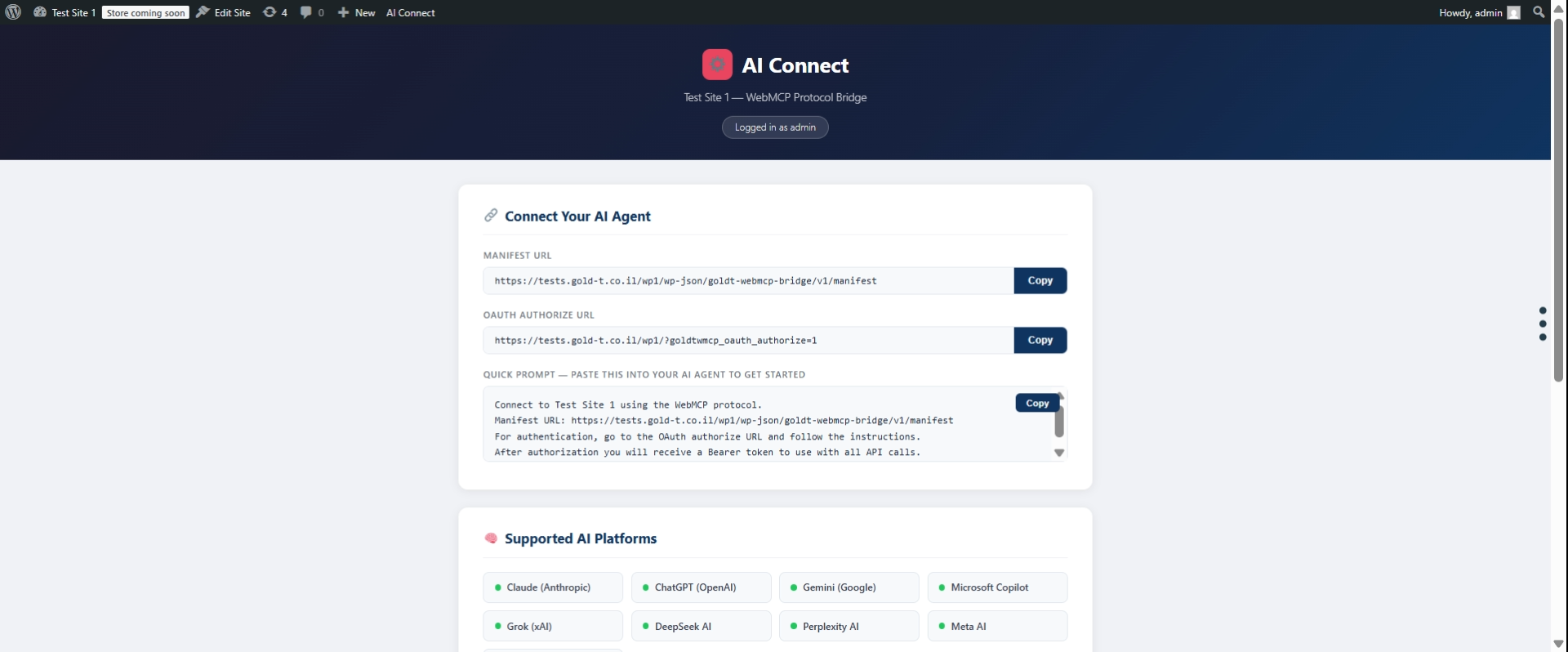
“I want to connect you to my WordPress site at https://mysite.com using GoldT WebMCP Bridge plugin. The manifest is at /wp-json/goldt-webmcp-bridge/v1/manifest. Use OAuth 2.0 with client_id: claude-ai”
The AI will guide you through OAuth authorization – you’ll approve access in your browser.
🤖 Supported AI Agents
Pre-registered and ready to connect:
- Claude AI – Use
client_id: claude-ai(Anthropic) - ChatGPT – Use
client_id: chatgpt(OpenAI) - Gemini – Use
client_id: gemini(Google) - Grok – Use
client_id: grok(xAI) - Perplexity AI – Use
client_id: perplexity - Microsoft Copilot – Use
client_id: copilot - Meta AI – Use
client_id: meta-ai(Facebook) - DeepSeek – Use
client_id: deepseek
All clients use OAuth 2.0 with PKCE and redirect_uri: urn:ietf:wg:oauth:2.0:oob (out-of-band).
🛠️ Available Tools
- wordpress.searchPosts – Search posts with filters
- wordpress.getPost – Get single post by ID or slug
- wordpress.searchPages – Search pages
- wordpress.getPage – Get single page by ID or slug
- wordpress.getCurrentUser – Get authenticated user info
- translation.translate – Translate text via MyMemory API (when Translation Provider = mymemory)
- translation.getSupportedLanguages – List supported language codes (when Translation Provider = mymemory)
🔒 How Authentication Works
Secure OAuth 2.0 Authentication:
Uses the same security standard trusted by Google, Facebook, and GitHub:
- AI agent initiates OAuth flow with code challenge (PKCE)
- User approves in browser (consent screen)
- Agent receives one-time authorization code
- Agent exchanges code for access token using code verifier
- Agent uses token for API calls
The AI agent operates as the user who authorized:
* The agent receives an OAuth token linked to that user’s ID
* All API requests run with that user’s permissions
* The agent respects WordPress user capabilities
Examples:
If Administrator authorizes:
* ✅ Sees all posts (including drafts, private)
* ✅ Full access based on admin capabilities
If Subscriber authorizes:
* ✅ Sees only published content
* ❌ Cannot see drafts or private content
Security: Authorization codes are one-time use (10 min expiry). Access tokens expire after 1 hour. Refresh tokens valid for 30 days. PKCE ensures tokens can’t be stolen.
⚙️ Admin Settings
Configure the plugin at GoldT WebMCP Settings:
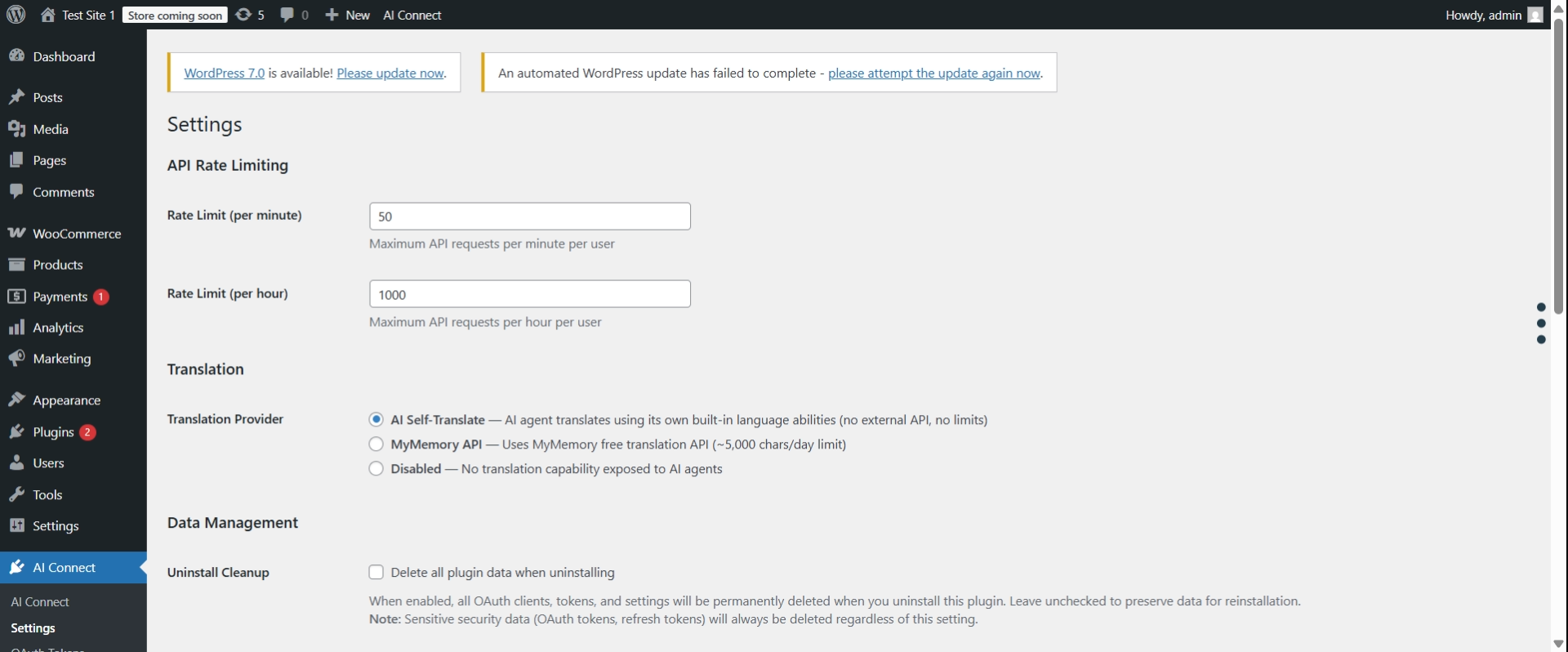
Translation Provider:
- AI Self-Translate (default) – The AI agent handles translation on its own; no translation tools appear in the manifest
- MyMemory API – Plugin calls MyMemory and returns translated text;
translation.translateandtranslation.getSupportedLanguagestools are added to the manifest - Disabled – Translation tools are hidden from the manifest entirely
Rate Limiting:
- Default: 50 requests per minute, 1,000 per hour (per user)
- Adjust both values in GoldT WebMCP Settings
🔐 Admin Controls
For Site Administrators:
Manage security from the WordPress admin panel:
- Revoke OAuth Tokens – Go to GoldT WebMCP OAuth Tokens to view and revoke active tokens
- Block Users – Go to GoldT WebMCP Settings scroll to “Manage User Access” section
- Rate Limits – Configure request limits in GoldT WebMCP Settings (default: 50/min, 1000/hour)
💬 We Need Your Feedback!
Help us build what YOU need:
- 💡 What tools would be most useful? Tell us which WordPress features you’d like AI agents to access
- 🐛 Found a bug? Report it so we can fix it quickly
- ⭐ Feature requests – We prioritize based on community feedback
How to provide feedback:
* GitHub: https://github.com/chgold/goldt-wp-webmcp-bridge/issues
* WordPress.org: Support forum
Your feedback directly shapes the future of this plugin!
Troubleshooting
Missing Dependencies Error
Symptoms:
* Red error notice in WordPress admin
* Plugin appears active but doesn’t work
* REST API endpoints return 404
Solutions:
-
Download complete plugin (Recommended)
- Get the full ZIP with dependencies from GitHub Releases
- Delete the incomplete plugin folder
- Upload and activate the complete version
-
Manual composer install (Advanced)
- SSH into your server
- Run:
cd /path/to/wp-content/plugins/goldt-webmcp-bridge && composer install --no-dev
Common causes:
* exec() function disabled on server
* Composer not available on shared hosting
* Plugin directory not writable
How to diagnose:
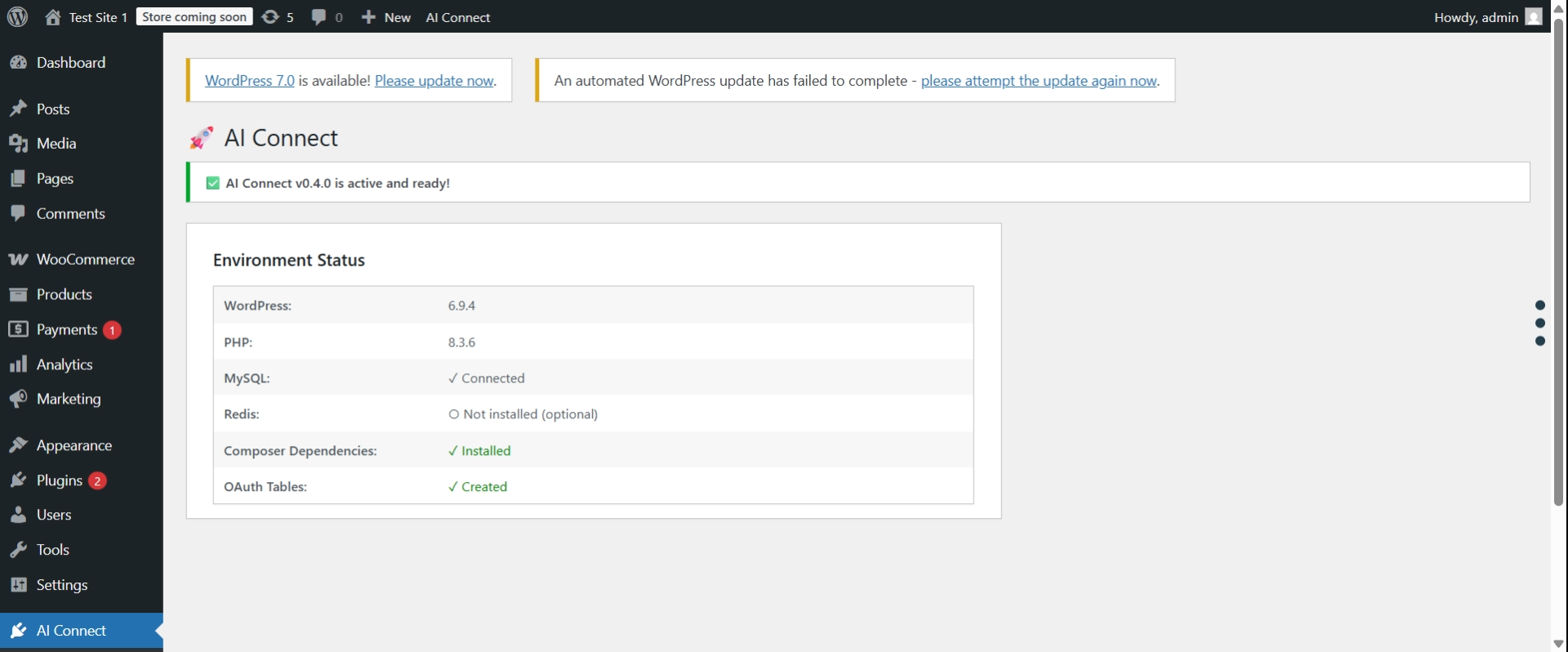
* Go to AI Connect Settings in WordPress admin
* Check the “Environment Status” table
* Look for red ✗ marks showing the exact issue
Database Tables Missing Error
Symptoms:
* Red error notice: “OAuth database tables were not created”
* OAuth authorization fails
Solution:
1. Deactivate the plugin
2. Reactivate the plugin
3. Check AI Connect Settings to verify “OAuth Tables: ✓ Created”
If problem persists:
* Your database user may not have CREATE TABLE permissions
* Contact your hosting provider or check wp-config.php
OAuth Authorization Fails
Symptoms:
* Clicking “Authorize” button does nothing
* Redirect loop during OAuth flow
* “invalid_client” or “invalid_request” errors
Solutions:
-
Clear WordPress rewrite rules:
- Go to Settings Permalinks
- Click “Save Changes” (flushes rewrite rules)
-
Verify OAuth tables exist:
- Go to AI Connect Settings
- Check “OAuth Tables: ✓ Created”
-
Verify client exists:
- Default clients (claude-ai, chatgpt, etc.) are auto-created
- If missing, deactivate and reactivate plugin
REST API Returns 404
Symptoms:
* /wp-json/goldt-webmcp-bridge/v1/manifest returns 404
* Tools API calls fail with 404
Solutions:
-
Flush permalinks:
- Go to Settings Permalinks
- Click “Save Changes”
-
Reactivate plugin:
- Go to Plugins page
- Deactivate and reactivate “GoldT WebMCP Bridge”
-
Check WordPress REST API:
- Visit:
http://yoursite.com/wp-json/ - If this also returns 404, your REST API is disabled or blocked
- Check for conflicting security plugins
- Review .htaccess rules
- Visit:
Still Having Issues?
Before asking for help, gather this information:
- Go to AI Connect Settings
- Take screenshot of “Environment Status” table
- Check browser console for errors (F12 Console)
- Check WordPress debug log (if enabled)
Get support:
* GitHub: https://github.com/chgold/goldt-wp-webmcp-bridge/issues
* WordPress.org: Support forum
External Services
This plugin optionally uses the MyMemory Translation API when the “Translation Provider” setting is set to “MyMemory API” in the plugin settings.
MyMemory API
- What it is: A free machine translation service
- When it is used: Only when an AI agent calls the
translation.translatetool AND the plugin settings have “MyMemory API” selected as the translation provider - What data is sent: The text to be translated and the target/source language codes
- Default: Disabled by default. The default provider is “AI Self-Translate” (no external requests)
- Terms of Service: https://mymemory.translated.net/terms-and-conditions
- Privacy Policy: https://mymemory.translated.net/terms-and-conditions
If “MyMemory API” is not selected, no data is sent to any external service.
Privacy Policy
GoldT WebMCP Bridge does not collect, store, or transmit any personal data to external services. All API requests are handled locally on your WordPress installation.
Data stored locally:
* OAuth clients (pre-registered: claude-ai, chatgpt, gemini)
* OAuth authorization codes (temporary, 10 min expiry, one-time use)
* OAuth access tokens (temporary, 1 hour expiry)
* Rate limiting counters
* User blacklist (WordPress user IDs only)
No data leaves your WordPress installation. This applies when using the default settings. If you enable the MyMemory API translation provider, text content will be sent to mymemory.translated.net. See “External Services” section for details.
Requirements
Component
Required
Notes
WordPress
✅ 6.0+
Core requirement
PHP
✅ 7.4+
With json, openssl
Composer
✅ Yes
For dependencies
HTTPS
⚠️ Production
Required for security
Redis
⭕ Optional
For high traffic
Credits
- Optional predis/predis support for rate limiting
- Compliant with WebMCP protocol specification
Made with ❤️ for the WordPress & AI community
Screenshots
Installation
Automatic Installation
- Go to Plugins Add New in WordPress admin
- Search for “GoldT WebMCP Bridge”
- Click Install Now and then Activate
Manual Installation
- Download the plugin zip file
- Go to Plugins Add New Upload Plugin
- Upload the zip file and click Install Now
- Activate the plugin
Note: All required dependencies are included. No manual setup required!
Setup
No setup required! The plugin works immediately after activation.
Optional: Configure rate limits in GoldT WebMCP Settings
For detailed setup and testing examples, see the plugin documentation on GitHub.
FAQ
-
What is WebMCP?
-
WebMCP (Web Model Context Protocol) is a standardized protocol for connecting AI agents to web services. It defines how AI assistants discover, authenticate with, and execute tools on web platforms.
-
Does this work with ChatGPT and Claude?
-
Yes! GoldT WebMCP Bridge works with any AI platform that supports REST APIs. This includes ChatGPT (OpenAI), Claude (Anthropic), Make.com, Zapier, and custom applications.
-
Why does reading public content require authentication?
-
All API calls require authentication for security:
* Rate Limiting – Prevents spam and abuse
* Monitoring – Track who uses your API
* Security – Protects against data scraping and DDoS attacksThis is the industry standard (Twitter, GitHub, Google APIs all require auth).
Exception: The manifest endpoint is public (no auth needed).
-
How does the AI agent authentication work?
-
OAuth 2.0 Authorization: The AI agent operates as the WordPress user who authorized it.
When a user approves access through the OAuth consent screen:
* The agent receives an access token linked to that user’s ID
* All API requests run with that user’s permissions
* The agent inherits the user’s capabilitiesSecurity:
* No passwords are transmitted – only authorization codes
* PKCE prevents authorization code interception
* Tokens are time-limited (1 hour) and can be revoked
* The agent respects WordPress user capabilities -
Is Redis required?
-
No, Redis is optional. The plugin works perfectly with WordPress transients. However, Redis is recommended for high-traffic sites (>1,000 requests/day) as it provides better rate limiting performance.
-
Can I add custom tools?
-
Yes! GoldT WebMCP Bridge is extensible. Use WordPress hooks to add custom tools:
`phpadd_action(‘goldtwmcp_register_modules’, function($goldtwmcp_plugin) {
$manifest = $goldtwmcp_plugin->get_manifest_instance();
$manifest->register_tool(‘mysite.getStats’, […]);
});
`Important: Place your custom tools in your theme’s
functions.phpor a separate plugin – they will be preserved during plugin updates.See the plugin documentation for more details.
-
How long do tokens last?
-
- Access Token: 1 hour (3600 seconds)
- Refresh Token: 30 days (2,592,000 seconds)
Use the refresh token to get a new access token without re-authentication.
-
Can I revoke access?
-
Yes! Multiple options:
Revoke specific OAuth token:
* Go to GoldT WebMCP OAuth Tokens
* Find the token and click “Revoke”Block specific user:
* Go to GoldT WebMCP Settings
* Enter user ID in “Block User” section
* User cannot authenticate or use existing tokens -
How do I troubleshoot authentication errors?
-
Common issues:
- “invalid_client” – Check client_id (use: claude-ai, chatgpt, or gemini)
- “invalid_grant” – Authorization code expired or already used (codes are one-time, 10 min expiry)
- “access_denied” – User is blocked (check GoldT WebMCP Settings Manage User Access)
- “Token expired” – Access token expired after 1 hour, use refresh token to get new access token
- “Rate limit exceeded” – Wait for retry period or increase limits in Settings
Enable WordPress debug mode and check
wp-content/debug.logfor details. -
Where can I get support?
-
- Community: WordPress.org support forums
Reviews
There are no reviews for this plugin.
Contributors & Developers
“GoldT WebMCP Bridge” is open source software. The following people have contributed to this plugin.
Contributors
Translate “GoldT WebMCP Bridge” into your language.
Interested in development?
Browse the code, check out the SVN repository, or subscribe to the development log by RSS.
Changelog
0.5.3 – 2026-06-01
- Fixed: Admin status page was displaying version 0.4.0 instead of the actual plugin version. Changed hardcoded
$version = '0.4.0'class property to useGOLDTWMCP_VERSIONconstant.
0.5.2 – 2026-06-01
- Fixed: Replaced deprecated
mysql2date()calls withgmdate()in OAuth tokens admin view (deprecated since WordPress 5.3).
0.5.1 – 2026-06-01
- Fixed: Settings link in plugins list pointed to non-existent page slug
goldtwmcp— corrected togoldt-webmcp-bridge. - Fixed: Two unescaped
echocalls in admin status page wrapped withesc_html(). - Removed: Unnecessary WooCommerce recommendation notice (WooCommerce is not required by this plugin).
0.4.6 – 2026-05-20
- Fixed (security): searchPosts and searchPages now hardcode post_status=publish instead of ‘any’. WP_Query with ‘any’ bypasses WordPress capability checks entirely and returns all posts including other users’ drafts — even to subscribers. Reverted to explicit ‘publish’.
0.4.5 – 2026-05-19
- Fixed: Copy Code button on the OAuth authorization code page (OOB) was silently failing — the
copyCode()JavaScript function was missing. Added withnavigator.clipboardAPI andexecCommandfallback. - Added:
webmcp-master.aiadded to the supported platforms list on the/ai-connect/info page.
0.4.4 – 2026-05-19
- Fixed: WordPress.org review — MyMemory external service URLs updated to working addresses.
- Fixed: WordPress.org review —
searchPostsandsearchPagesnow use native WordPress capability filtering (post_status => 'any'): subscribers see only published posts, authors see their own drafts, editors/admins see all. Thestatusparameter has been removed from the tool schema since it is no longer needed. - Fixed: WordPress.org review —
getPostandgetPagenow enforcecurrent_user_can('read_post')for non-published content, preventing unauthorized access to drafts/private pages by ID.
0.4.3 – 2026-05-19
- Fixed:
wp plugin checkwarnings — renamed unprefixed view variables togoldtwmcp_prefix; wrapped$tableinesc_sql()in schema-introspection queries; suppressed false-positivePluginCheck.Security.DirectDBwarnings on whitelisted SQL fragments.
0.4.2 – 2026-05-18
- Fixed: PHPCS WordPress coding standards compliance — resolved 16 errors and 3 warnings across
class-database.php,class-token-registry.php,class-oauth-server.php, andadmin-token-registry.php.
0.4.1 – 2026-05-13
- Added: Manifest now exposes
auth.registered_clients— an object mapping each registered OAuthclient_idto its display name, so AI agents can discover which clients this site accepts without an extra round-trip. - Added: New default OAuth client
webmcp-master(WebMCP Master) with full scopes (read,write,delete,manage_users) — seeded on fresh installs and idempotently inserted on upgrade for existing sites. - Schema: Database upgrade routine 1.4.0 — inserts the
webmcp-masterclient when missing.
0.4.0 – 2026-05-11
- Added: Token Registry — sidecar table (
{prefix}aiconnect_token_registry) records every issued/refreshed token (only the 16-char prefix is stored, not the full secret), tracking issued_at / expires_at / last_used_at / revoked_at / revoked_by / source / ip_address. - Added: Admin REST endpoints
GET /wp-json/goldt-mcp/v1/admin/tokensandDELETE /wp-json/goldt-mcp/v1/admin/tokens/{id}(manage_options only). - Added: WP-Admin sub-page “AI Connect Token Registry” to view and revoke active tokens with active / revoked / all filters.
- Improved: Bearer-auth lookups now update
last_used_atand reject tokens revoked in the registry (defense in depth). - Improved: Token revocation is now a soft-delete (revoked_at + revoked_by) instead of a hard delete; refresh-token rotation also flows through the registry.
- Schema: Database upgrade routine 1.3.0 — creates the new table on activation and on upgrade, with column-by-column ALTER fallback for partial pre-existing installs.
0.3.3 – 2026-05-06
- Fixed: Removed “Powered by AI Connect” credit link from public-facing info page (WordPress.org compliance)
0.3.2 – 2026-04-12
- Fixed: “Revoke All Tokens” button now actually revokes all active tokens in the database
- Fixed: Tool names now use lowercase module prefix (wordpress.searchPosts) per WebMCP protocol spec
- Improved: CSS/JS extracted to assets/ using wp_enqueue_style/wp_enqueue_script (WordPress.org compliance)
- Improved: Admin settings page cleaned up – removed irrelevant status rows
- Added: External Services disclosure for MyMemory API (WordPress.org compliance)
0.3.0
- Added: Translation Provider setting (AI Self-Translate, MyMemory API, or Disabled)
- Added: TranslationModule with MyMemory API integration (translate, getSupportedLanguages)
- Added: Dynamic manifest instructions to prevent AI agents from inventing capabilities
- Improved: OAuth client_id is now optional (defaults to ‘claude’)
- Improved: Fuzzy client_id matching (recognizes variants like gemini_client, claude_ai)
- Improved: Specific OAuth error messages instead of generic errors
0.2.1 – 2026-03-06
- Security: Added OAuth scope validation – users must explicitly grant permissions for each tool
- WordPress.org Compliance: Fixed inline scripts/styles – moved to wp_enqueue_script/style
- WordPress.org Compliance: Removed /status endpoint per security review
- WordPress.org Compliance: Updated .distignore to exclude vendor development files
- Fixed: Updated Bearer_Auth endpoint paths to current plugin slug
- Improved: 3-layer security architecture (authentication, rate limiting, authorization)
0.2.0 – 2026-02-23
- Security: Migrated to OAuth 2.0 with PKCE for secure authentication
- Added: 8 pre-registered AI clients (Claude, ChatGPT, Gemini, and more)
- Added: Parameter validation and resource limits (prevents abuse)
- Improved: Security hardening – comprehensive input validation
0.1.2 – 2026-02-19
- Added: Translation support for 12 languages
0.1.1 – 2026-02-16
- Improved: Bundled all dependencies – no manual setup required
0.1.0 – 2025-02-13
- Initial public release
- WebMCP protocol support
- 5 WordPress core tools