

Description
Japanized for WooCommerce is the essential toolkit for running a WooCommerce store in Japan. This plugin bridges the gap between WooCommerce’s global features and Japan’s unique e-commerce requirements.
Why You Need This Plugin
Running an online store in Japan requires specific features that standard WooCommerce doesn’t provide out of the box:
* Japanese address formats with proper field ordering (postal code, prefecture, city, address lines)
* Name reading fields (Yomigana/Furigana) for accurate customer identification
* Delivery date and time selection that customers expect
* Popular Japanese payment methods like bank transfer and COD
* Legal compliance with Japan’s Specified Commercial Transaction Act (特定商取引法)
Who Should Use This
This plugin is designed for:
* Japanese e-commerce businesses using WooCommerce
* International stores shipping to Japanese customers
* Anyone who needs Japanese address handling and payment methods
* Stores requiring delivery date/time selection functionality
Seamless Integration
Works smoothly with WooCommerce core features and popular extensions. Fully compatible with the new WooCommerce Blocks checkout experience. All features are optional – enable only what you need for your store.
Key Features
Address & Name Management
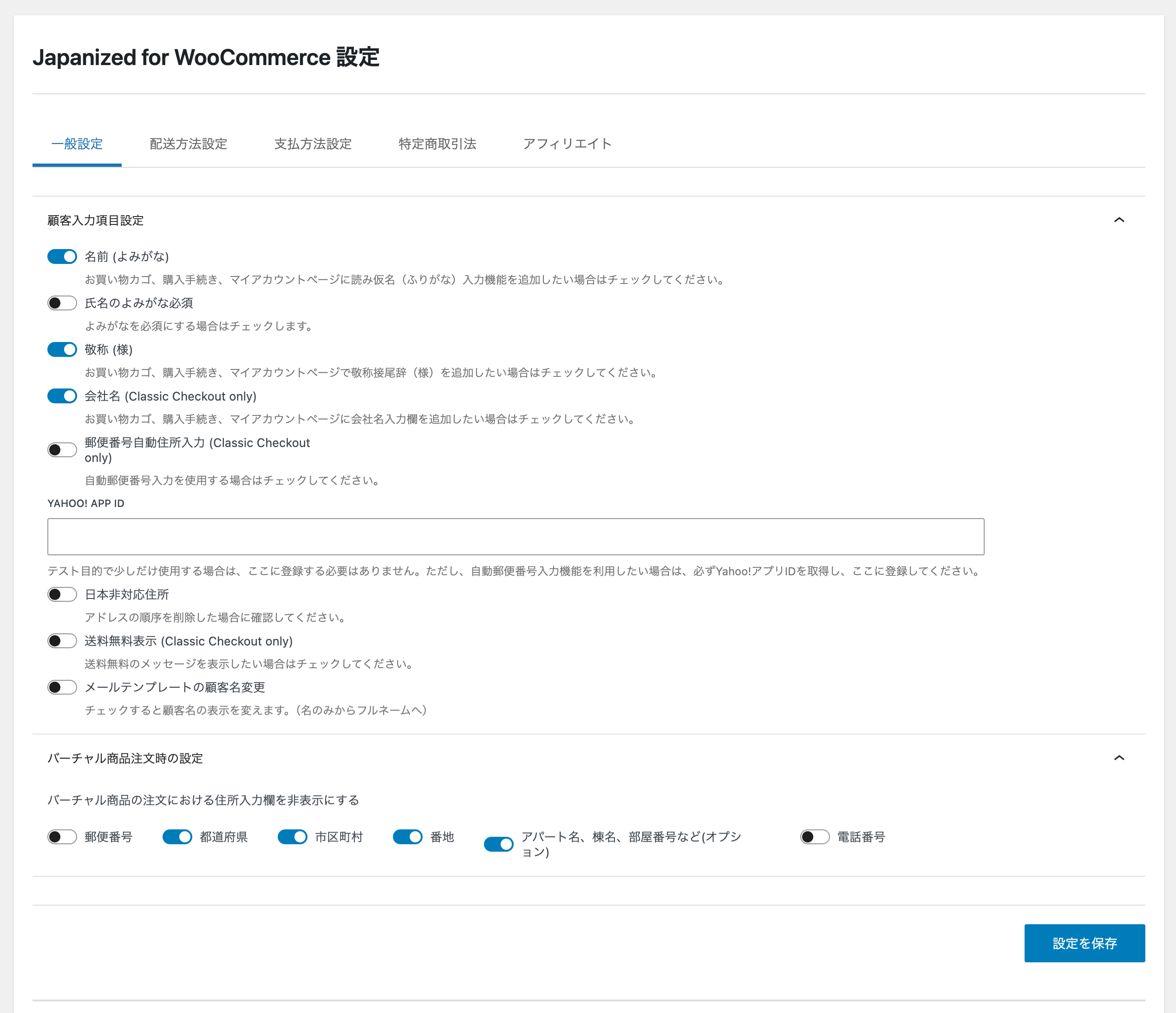
* Name reading (Yomigana/Furigana) input fields for billing and shipping addresses
* Honorific title (様/sama) automatically added after customer names
* Japanese-style address format with proper field ordering
* Auto-fill address from postal code using Yahoo! API integration
* Company name field support
Shipping & Delivery
* Delivery date and time selection at checkout
* Delivery time slot management
* Holiday and non-delivery day settings
* Weekend and specific date exclusions
* Delivery-related fields hidden when free shipping is applied
Payment Methods
* Bank Transfer (Japanese banks)
* Japan Post Bank Transfer
* Cash on Delivery (COD) with fee calculation
* COD subscription support
* Pay at Store (over-the-counter payment)
* Paidy (Buy Now, Pay Later) – Official Japanese payment gateway
Legal & Compliance
* Specified Commercial Transaction Act (特定商取引法) page creator
* Shortcode support for legal information display
* Customizable legal notice templates
Security Check
* Checks the installed plugins, themes and WordPress against known vulnerabilities once a day (data from Wordfence Intelligence, delivered by wc.artws.info)
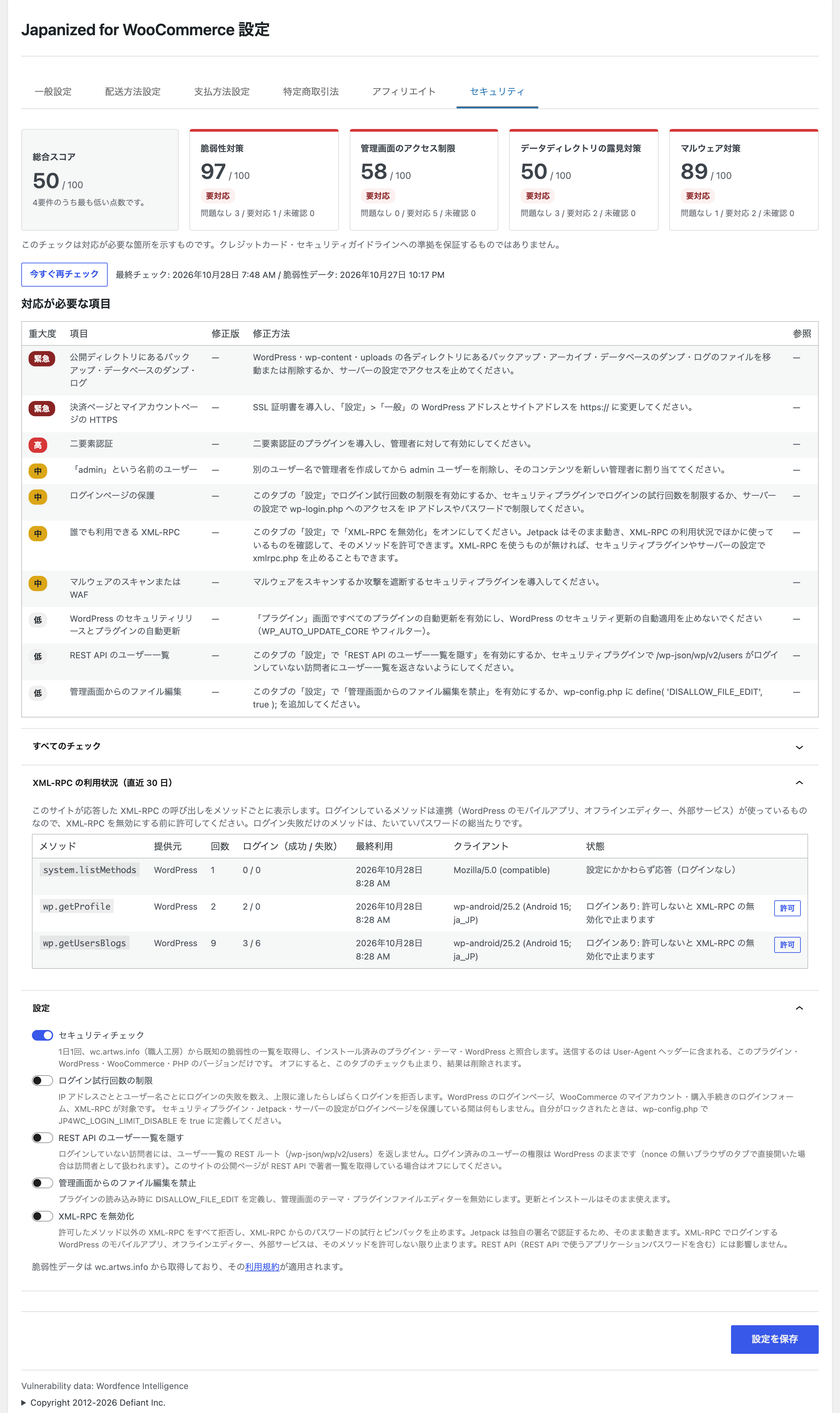
* 17 checks in all, including HTTPS on the checkout and My Account pages, two-factor authentication, file editing in the admin, and backups or logs left in public directories
* A score for each of the four requirements of Japan’s Credit Card Security Guidelines (クレジットカード・セキュリティガイドライン), with the items that need action and how to fix them; it shows what needs attention and does not guarantee compliance
* “Re-check now” on the Security tab; on by default and can be turned off there
* Login attempt limiter (off by default): counts failed logins per IP address and per user name on the WordPress and WooCommerce login forms, and stays out of the way when a security plugin, Jetpack or the server already protects the login page
* More hardening options (off by default): hide the user list of the REST API from visitors who are not logged in, forbid file editing in the admin screens (DISALLOW_FILE_EDIT), and turn XML-RPC off except for the methods you allow (Jetpack keeps working)
* Free security check by wc.artws.info (optional, only after you agree on the Security tab): sends the list of plugins and themes and the results of the checks, shows a report with the items that need action and how to fix them, and its data can be deleted from the same tab
* A record of the XML-RPC calls of the last 30 days, kept on the site, that shows which methods are used, by which client and whether they log in, so that you can tell integrations from password guessing before turning XML-RPC off
Additional Features
* Email template optimization for Japanese format
* Address validation for Japanese postal codes
* Affiliate integration (A8.net, Access Trade, Value Commerce)
* WooCommerce Blocks compatibility
Note: Paidy Checkout is also available as a standalone payment plugin.
External Services
This plugin connects to the following third-party services:
- Yahoo! Japan Web API (yahoo.co.jp) — used by the postal-code auto-fill feature to look up a Japanese address from a postal code entered at checkout. The postal code is sent to Yahoo! Japan’s address lookup API whenever a customer uses this feature; it uses a merchant-configured Application ID (Japan Settings Address Form) if one is set, and a bundled shared ID otherwise, so it is active whenever the postal-code auto-fill feature itself is used, not only once an ID is configured. See Yahoo! Japan’s own site for their terms of service and privacy policy.
- Paidy payment API (api.paidy.com) — used by the Paidy (Buy Now, Pay Later) payment gateway to process and verify payments. Only active when the Paidy gateway is enabled. See Paidy’s own site for their terms of service and privacy policy.
- Artisan Workshop Paidy onboarding intermediary (paidy.artws.info) — used only while applying for a Paidy merchant account through this plugin’s setup wizard (available even before the gateway is enabled, since onboarding is how it becomes eligible to be enabled). Submitting the application form sends the store’s site name and URL, the merchant’s contact details (email, phone), the representative’s name and date of birth, the submitted screening survey answers, and a site-specific verification hash, to this Artisan Workshop-operated intermediary, which relays the application to Paidy and later delivers the issued API credentials back to the site.
- Artisan Workshop promotion service (wc.artws.info) — the plugin’s own first-party service. It is contacted automatically (no setting to disable it) to fetch promotional notice content shown in the WordPress admin dashboard to users who can manage WooCommerce, on stores with at least one order placed in the last 5 days. No order, customer, or site-configuration data is sent or received beyond the request itself.
- Artisan Workshop vulnerability feed (wc.artws.info) — used by the security check (WooCommerce JP4WC Settings Security), which is on by default, including on sites updated from an earlier version. Shortly after the plugin is installed or updated, and then once a day, WP-Cron downloads the list of known vulnerabilities in WordPress plugins, themes and core from
https://wc.artws.info/feed/v1/(data from Wordfence Intelligence) and compares it with the installed software on the site itself; “Re-check now” on the Security tab also downloads it at once when no list is stored yet. The requests are plain downloads: they carry only a User-Agent header with the versions of this plugin, WordPress, WooCommerce and PHP, and like any request they reveal the server’s IP address. These downloads do not send the site URL, the list of installed plugins and themes or the results of the check (only the free security check below sends them, after consent); the other checks on the Security tab run on the site and send requests only to the site’s own address. Turning the security check off on the Security tab stops the requests and deletes the downloaded data and the results. Terms of use: https://wc.artws.info/security-assessment-term/ Privacy policy: https://wc.artws.info/privacy-policy/ - Artisan Workshop free security check (wc.artws.info, operated by 職人工房 合同会社) — optional, and nothing is sent until it is used. Only when a store manager agrees to the terms of use and the privacy policy on the Security tab and clicks “Agree and run the check” (later “Run the check again”), the plugin sends
POST https://wc.artws.info/wp-json/artws-sec/v1/scanwith:schema_version,site_url(the site address),wp_ver,wc_ver,php_verandjp4wc_ver(the versions of WordPress, WooCommerce, PHP and this plugin),locale,software(thetype,slug,versionandactivestate of every installed plugin and theme),local_findings(thecheck_idandstatusof each check on the Security tab, never the settings behind them),consent_versionand, only when a separate box is ticked (off by default, offered only to stores in Japanese yen),revenue_bandandorder_band(the revenue and the number of paid orders of the last 12 months as band codes, never the amounts). The consent screen shows every value before it is sent. The administrator’s e-mail address, customer data, order amounts, API keys, the contents of wp-config.php and server paths are not sent. The response is a report shown on the Security tab and, on the first check, a site identification token issued by wc.artws.info, which the plugin keeps without showing it and sends with later checks and with the deletion. wc.artws.info keeps the data for 180 days. It uses the data to make the report, to improve the service, for security information on wc.artws.info (aggregated so that no site can be identified) and, through staff of 職人工房 合同会社 looking at each registration, to answer inquiries, investigate problems, confirm deletion requests and review the priority of measures for the size of the store. The bands are used only to show that priority in the report, to improve the service, for the aggregated security information and for the staff check. The data and the reports are never used for sales or advertising. “Delete check data” on the Security tab sendsDELETE https://wc.artws.info/wp-json/artws-sec/v1/siteand removes the consent, the token and the report from the site; deleting the plugin from the Plugins screen sends the same request. Nothing is sent by WP-Cron. Terms of use: https://wc.artws.info/security-assessment-term/ Privacy policy: https://wc.artws.info/privacy-policy/
Screenshots


Installation
Minimum Requirements
- WordPress 6.0 or greater
- WooCommerce 8.0 or greater
- PHP version 8.3 or greater
- MySQL version 5.6 or greater
- WP Memory limit of 64 MB or greater (128 MB or higher is preferred)
Automatic installation
Automatic installation is the easiest option as WordPress handles the file transfers itself and you don’t need to leave your web browser. To do an automatic install of Japanized For WooCommerce, log in to your WordPress dashboard, navigate to the Plugins menu and click Add New.
In the search field type “Japanized For WooCommerce” and click Search Plugins. Once you’ve found our eCommerce plugin you can view details about it such as the the point release, rating and description. Most importantly of course, you can install it by simply clicking “Install Now”.
Manual installation
The manual installation method involves downloading and uploading our plugin to your webserver via your favorite FTP application.
FAQ
-
Do I need this plugin to use WooCommerce in Japan?
-
While WooCommerce can work in Japan without this plugin, Japanized for WooCommerce provides essential features that Japanese customers expect, such as delivery date selection, name reading fields (Yomigana), and local payment methods. It significantly improves the user experience for Japanese e-commerce.
-
Does this plugin work with WooCommerce Blocks?
-
Yes! Version 2.8.0 and later fully supports the new WooCommerce Blocks checkout experience, including delivery date selection and custom address fields.
-
How do I enable the postal code auto-fill feature?
-
You need to obtain a free Yahoo! Japan Application ID from the Yahoo! Developer Network. Once you have the ID, enter it in the WooCommerce Settings Japan Settings Address Form section.(Classic Checkout only)
-
Which payment methods are included?
-
The plugin includes: Bank Transfer (Japanese banks), Japan Post Bank Transfer, Cash on Delivery (COD) with fee calculation, Pay at Store, and Paidy (Buy Now, Pay Later). Paidy is also available as a standalone plugin.
-
Can I use only specific features and disable others?
-
Yes, absolutely! All features are modular and can be enabled or disabled individually from the plugin settings. You only need to activate the features your store requires.
-
Is the plugin compatible with multilingual sites?
-
Yes, the plugin is compatible with WPML and other multilingual plugins. It automatically detects the language and adjusts features accordingly. Japanese-specific features are only applied when the site language is set to Japanese.
-
How do I set up delivery date and time selection?
-
Go to WooCommerce Settings Japan Settings Delivery Date. You can configure available delivery times, set holidays, exclude specific days of the week, and customize the delivery date display format.
-
Does this plugin modify WooCommerce core files?
-
No, the plugin uses WordPress and WooCommerce hooks and filters. It doesn’t modify any core files, making it safe to use and easy to update.
-
Where can I get support?
-
For support, please visit the plugin support forum on WordPress.org or check the official documentation.
-
Is this plugin free?
-
Yes, Japanized for WooCommerce is completely free and open source under the GPLv3 license.
Reviews


Contributors & Developers
“Japanized for WooCommerce” is open source software. The following people have contributed to this plugin.
Contributors


“Japanized for WooCommerce” has been translated into 1 locale. Thank you to the translators for their contributions.
Translate “Japanized for WooCommerce” into your language.
Interested in development?
Browse the code, check out the SVN repository, or subscribe to the development log by RSS.
Changelog
3.0.2 – 2026-11-05
- Added – Two hooks for the scheduled updates of Japanized for WooCommerce Pro and similar plugins: the filter
jp4wc_security_check_updates_automaticallylets a plugin that updates other plugins on its own schedule have them counted as updated automatically by the security check, and the actionjp4wc_security_findings_updatedfires with the results each time the security check saves them (#300) - Changed – The free security check by wc.artws.info asks for consent again under its revised terms of use and privacy policy (revised on 2026-10-29, in force from 2026-11-05): staff of 職人工房 合同会社 may look at the information sent and the reports of each registration to answer inquiries, investigate problems, confirm deletion requests and review the priority of measures for the size of the store, and they are never used for sales or advertising. Stores that agreed to the earlier text see a notice on the Security tab and agree again from “Get the free check”; they keep their registration, and the revenue and order bands are sent again only when the box is ticked again. A Security tab opened before the update asks for a reload instead of recording a consent to a text it did not show (#311)
- Fixed – Bundled Japanese translation: 19 strings had no translation (among them the settings of Cash on Delivery for Subscriptions and some Paidy error messages), and six strings of the COD fee settings on the settings screen showed in English on every Japanese site, because WordPress uses the bundled translation of the settings screen instead of the language pack’s and it lacked them. Translation files that no page loads are no longer shipped (#308)
- Fixed – The security check no longer reports two items as passed while they are still open. The user list of the REST API is also checked at
?rest_route=/wp/v2/users, which WordPress answers whatever the permalinks, so a site that blocks only/wp-json/wp/v2/usersnow fails the check, and the item is shown as unconfirmed when only one of the two addresses can be checked; anX-WP-Totalheader sent twice no longer causes a PHP warning. The check for backups and database dumps in public directories also finds UpdraftPlus database backups (-db.gz),.sqland.tarfiles compressed with bzip2, xz or zstd,.tbz2,.txzand All-in-One WP Migration’s.wpress, while public files such assitemap.xml.gzare still left alone (#315) - Fixed – The free security check could send the revenue and order bands when the information shown before sending said they were not sent: when the checks above finished again while a check without the bands was running, the box for the bands could turn itself on while the list of the information sent still said “Not sent”, and “Run the check again” then sent the bands. The box now always matches the information shown (#317)
- Fixed – The Security tab no longer says the vulnerability data has not been downloaded yet while downloading it fails. It shows when the last download failed and why (this server could not connect to wc.artws.info, wc.artws.info returned an error, the data was damaged, the PHP zlib extension is missing, or the data could not be saved in the uploads directory), and whether the vulnerability data downloaded earlier is still used meanwhile. A server without the zlib extension no longer downloads the vulnerability data every day only to fail, and the notice shown when no vulnerability data could be downloaded for three days names the “Security check” setting on the Security tab (#316)
- Security – The login attempt limiter counts an IPv6 address together with the rest of its /64 network, so a client cannot get past the per-address limit by taking a new address for every attempt; an IPv4 address, including one that reaches the site as an IPv4-mapped IPv6 address, is still counted on its own. The new filter
jp4wc_login_limit_ipv6_prefixchanges the network length (32 to 128). Failures already counted for IPv6 addresses start over with this update (#314)
3.0.1 – 2026-10-31
- Added – The report of the free security check starts with a comparison with the checks on the Security tab: what only the free check found, what only the checks on the tab found and which checks on the tab could not be confirmed, or that the result is the same. The comparison is not included when the report is saved as a PDF (#305)
- Changed – The free security check opens from a “Get the free check” button: the information to be sent and the consent appear only when it is clicked, and nothing is sent until a store manager agrees and clicks “Agree and run the check”. Once the site has agreed, the box for the revenue and order bands stays next to “Run the check again”, and the information sent opens from a link (#305)
3.0.0 – 2026-10-30
- Added – A security check for the site, on a new Security tab (WooCommerce JP4WC Settings Security). Once a day it downloads a list of known vulnerabilities from wc.artws.info (data from Wordfence Intelligence) and checks the installed plugins, themes and WordPress against it; only the versions of this plugin, WordPress, WooCommerce and PHP are sent, in the User-Agent header. Users who can manage WooCommerce see an admin notice when an installed version is affected, and dismissing it hides it until the findings change. The check is on by default, including on sites updated from an earlier version; turning it off on the Security tab stops the downloads and deletes the downloaded data and the results (#257)
- Added – The security check also runs the other 16 of its 17 checks on the site’s own setup, such as HTTPS on the checkout and My account pages, two-factor authentication, a user named “admin”, file editing in the admin, and backups, database dumps or logs left in public directories, and scores each of the four requirements of Japan’s Credit Card Security Guidelines (クレジットカード・セキュリティガイドライン) out of 100; the checks that request the site’s own pages send those requests only to the site’s own address, and a check that cannot tell is shown as unconfirmed instead of being counted as a failure (#258)
- Added – The Security tab shows the total score (the lowest of the four requirements) and a card for each requirement, the items that need action with the fixed version and how to fix each one, a list of all checks, and “Re-check now”, which runs the check again in the background (WP-Cron) and shows the results when it finishes; it shows what needs attention and does not guarantee compliance with the guidelines (#259)
- Added – The Security tab links to the terms of use of wc.artws.info, which apply to the vulnerability data (#286)
- Added – A login attempt limiter on the Security tab (off by default): failed logins are counted per IP address and per user name on the WordPress login page, the WooCommerce My account and checkout login forms and XML-RPC, and once the limit is reached further attempts for that address or name are refused for a while, even with the right password (default 10 per address, 5 per name, 15 minutes; all adjustable). It stays out of the way when a known security plugin, Jetpack’s brute force protection (with Jetpack connected) or the server already protects the login page, and
define( 'JP4WC_LOGIN_LIMIT_DISABLE', true )in wp-config.php turns it off from outside (#289) - Added – Two hardening options on the Security tab (off by default) for the items the security check finds open: hide the user list of the REST API (
/wp-json/wp/v2/users) from visitors who are not logged in, and forbid file editing in the admin screens (DISALLOW_FILE_EDIT, unless wp-config.php already defines it) (#291) - Added – XML-RPC on the Security tab: a record of the XML-RPC calls of the last 30 days, kept on the site whatever the setting (which methods were called, how often, by which client and whether their logins worked), and an option (off by default) that refuses every XML-RPC method except the ones you allow, so that no password can be tried and no pingback sent through XML-RPC. Requests handled by Jetpack’s connection are left alone, so Jetpack keeps working (#293)
- Added – A free security check by wc.artws.info on the Security tab, optional: nothing is sent until a store manager agrees to the terms of use and the privacy policy and clicks the button. It sends the site address, the versions of WordPress, WooCommerce, PHP and this plugin, the language, the installed plugins and themes, and the results of the checks on the tab (and, only when a separate box is ticked, which is offered only to stores in Japanese yen, the revenue and order bands of the last 12 months, never the amounts), and shows the report that comes back: the installed software checked against the latest vulnerability data, a score for each requirement and what to do first. The consent screen shows every value before it is sent; “Delete check data” deletes the data on wc.artws.info and on the site, and deleting the plugin sends the same request (#260)
2.9.20 – 2026-10-22
- Added – Administrators now see a dialog on admin screens when the site’s PHP is older than the fix for the critical PHP2Shell vulnerabilities (CVE-2026-109618 / CVE-2026-109619): PHP 8.2.35, 8.3.36, 8.4.27 or 8.5.12, with no fixed release for PHP 8.1 and older. It links to an article on updating PHP and notes that a hosting company may have patched PHP without changing its version number; “Don’t show again” hides it for that user until the PHP version changes. It is shown only to users who can manage the site’s options (super admins on multisite), and not in the block editor or the Customizer (#271)
2.9.19 – 2026-10-22
- Fixed – A request that was running while Japanized for WooCommerce was being updated could still stop with a fatal error (“Failed opening required …”) after the 2.9.18 fix (#266), because some files were read only later in the request: the Checkout block support of Paidy and of this plugin’s other payment methods, the delivery and yomigana fields of the Checkout block, the subscription price field, the settings screen’s REST API and the dashboard PHP version notice; these files are now all loaded when the plugin starts, so updating from this version to a later one no longer causes this error (#268)
2.9.18 – 2026-10-21
- Fixed – In the Checkout block, a customer who came back from Paidy Checkout after Paidy declined the payment saw no message, because the notice was only added on the classic checkout; the Checkout block now shows it as an error notice, and the classic checkout no longer shows it twice (#248)
- Fixed – The Paidy payment script was printed twice on the order-pay page and the Paidy settings were saved twice, because the Paidy webhook endpoint created its own copy of the Paidy gateway on every request; the endpoint now uses WooCommerce’s gateway, answers a webhook with HTTP 503 while Paidy is not in the payment method list, and a capture, cancel, refund or thank-you page completion skipped for that reason is now logged as a warning (#244)
- Fixed – Signed Paidy webhooks in sandbox mode were verified with the live secret key instead of the test secret key, so they could be rejected; the key is now chosen from the Paidy environment setting (#244)
- Fixed – With Paidy debug mode on, the URL of the capture request was never written to the log, unlike the cancel and refund requests; it is now logged as well (#247)
- Fixed – Since 2.9.14, the plugin package on WordPress.org also contained a copy of the release ZIP file, roughly doubling the download size; the package no longer includes it (#265)
- Fixed – A request that was running while Japanized for WooCommerce was being updated could stop with a fatal error (“Failed opening required … config-jp4wc-framework.php”), most visibly from the shipment tracking and Yamato export features of Japanized for WooCommerce Pro; the framework’s strings are now part of the framework class file, so updating from this version to a later one no longer causes this error, and the old strings file is kept for requests that are still running the previous version while this update is installed (#266)
2.9.17 – 2026-10-13
- Added – A “Morning” (午前中) option can be shown as the first delivery time zone: enable it under Delivery settings Delivery time settings (off by default) and customise its label; it is offered on both the classic and the block checkout and works even when no hourly time zone is registered (which previously caused a TypeError on the classic checkout); the Yamato B2 export of Japanized for WooCommerce Pro does not support it yet, so keep it off if you use that export until a Pro update adds it
- Fixed – Paidy payments whose payment ID contains a hyphen (
-) were rejected by the payment ID format check and never marked as paid, leaving the order pending until the stock hold cancelled it even though the customer had paid; the check now accepts the base64url alphabet Paidy actually uses (pay_[A-Za-z0-9_-]+) while keeping the URL injection protection (#223) - Fixed – In the Checkout block the Cash on Delivery fee could get out of step with the selected payment method on slower servers (a fee left behind after switching to another method, or missing after switching to COD); the fee is now calculated from WooCommerce’s own
chosen_payment_methodand from the payment method submitted with the order (#215) - Fixed – Saving any tab of the Japanized for WooCommerce settings screen wiped a Cash on Delivery fee that had been configured on the COD gateway’s own settings page; the settings screen now reports the values actually in force so they are preserved (#218)
- Fixed – The delivery date, delivery time zone and shipping date entered on the classic checkout were stored HTML-encoded (
&,',"), so a time zone label containing&,'or"was saved differently from the block checkout and showed up encoded in plain-text order emails; the values are now stored as entered, like the block checkout and the admin meta box, and escaped only where they are displayed (#224) - Fixed – Paidy Checkout failed to open on the payment page (a JavaScript syntax error) for orders with a zero-discount coupon such as a free-shipping coupon, a line item whose product had been deleted, or a fee whose name contains a line break or backslash, so the customer could not pay with Paidy and the order was left pending; the order items are now passed to Paidy as JSON, which also stops
&and similar characters in product and coupon names from showing up as&on the Paidy screen (#232) - Fixed – A connection error or timeout on a Paidy cancel, capture or refund request caused a fatal error (“Cannot use object of type WP_Error as array”), which for a refund left behind a WooCommerce refund that Paidy never made, and a refund answered without a status (for example a 502 error page) was also recorded as refunded; these requests now count as successful only when Paidy returns the payment as closed, and otherwise fail with an order note that includes the HTTP status (#231)
- Fixed – Applying for Paidy again through the onboarding wizard after a cancelled review or a plugin reinstall sent the application without the site hash that encrypts the delivered API keys and signs the key-delivery callback (and logged a PHP “Undefined variable” warning), so the API keys could not be delivered automatically; the application now always sends the hash the site has stored, creating and storing one when none is saved (#234)
- Fixed – Changing a Paidy order from Processing to Cancelled sent the cancel (close) request to Paidy up to three times, so the requests after the first one failed with HTTP 409 and left “cancellation not completed” order notes on an order that Paidy had in fact cancelled; a failed capture or refund was likewise sent and reported more than once. The capture, cancel and refund callbacks now run once per order status change, and the bundled Japanese translation of that order note, which said the opposite of the original, has been corrected (#241)
- Fixed – A second partial refund of a Paidy order failed (“An error occurred while attempting to create the refund using the payment gateway API.”), and changing a partly refunded Paidy order from Completed to Cancelled did not refund the rest, because only the first refund of an order was ever sent to Paidy; every refund is now sent, and the automatic refund on cancellation refunds only the remaining amount and is recorded as a WooCommerce refund, so the customer also receives the “refunded” e-mail for it (the order stays Cancelled) (#243)
- Security – A Checkout block draft order could be paid by Cash on Delivery through the Store API pay-for-order route or the classic order-pay page without the COD fee being applied; both paths now refuse COD/COD2 for draft orders and direct the customer to the checkout page
- Security – The order’s transaction ID is now validated against the Paidy payment ID format and
rawurlencode()-escaped before it is put into the cancel, capture and refund API URLs, as the payment lookup has been since 2.9.14; for an ID that does not match, no request is sent to Paidy and an order note is added (a capture also e-mails the shop’s notice address) (#233) - Removed – The usage tracking feature has been removed in preparation for a new feature that will replace it; no usage data is sent from this version on, and its setting, scheduled event and stored options are cleaned up on update (#239)
- Changed – The notification e-mail sent when a required delivery date or time zone is missing now goes only to the shop’s notification address (#239)
- Changed – Tested up to WordPress 7.1 and WooCommerce 11.2.1
2.9.16 – 2026-09-07
- Added – Paidy onboarding callbacks can now be authenticated via an HMAC-SHA256 signature shared at application time, in addition to the one-time state token; this restores automatic API key delivery for merchants whose token had already expired or was never issued
- Added – A “Back to Paidy settings” link on the onboarding “under review” screen so merchants who received their Paidy API keys separately can enter them manually without waiting for automatic delivery
- Security – Fixed a replay/idempotency gap where two concurrent Paidy onboarding callbacks authorized by the same state token (without an accompanying signature) could both be processed, duplicating the credential/status update
- Security – Paidy onboarding callbacks are now authenticated strictly from the signed request body; a query-string parameter could previously override a value that was actually covered by the signature
- Security – Paidy onboarding callbacks for an application that is no longer the current one on record are now rejected, preventing a delayed or resent callback from overwriting a newer application’s credentials
- Security – The Cash on Delivery / COD2 surcharge configured for Block Checkout could be bypassed by sending an invalid payment gateway ID to the cart-update endpoint while still completing the order via COD; the gateway ID is now validated against the site’s registered gateways
- Security – Decrypted Paidy API secret keys are no longer duplicated in plaintext in the diagnostic
paidy_received_dataoption; they remain stored (as before) in the gateway’s own settings - Fixed –
wizard=falsenow correctly shows the Paidy gateway’s manual configuration fields - Fixed – Uninstalling the plugin now also removes the signature- and event-claim option rows created by the onboarding receiver’s replay guards
- Fixed – A
wp_remote_post()failure during Paidy onboarding submission no longer also falls through to the HTTP-response-code error branch, avoiding duplicate log entries - Changed – The admin promotion notice and its “has recent orders” check are now cached for a short period instead of making an uncached remote request and database query on every wp-admin page load
- Changed – Tested up to WordPress 7.1 and WooCommerce 11.1.0
2.9.15 – 2026-07-08
- Added – COD fee feature for the “Cash on Delivery for Subscriptions” (COD2) gateway: fee name, amount, maximum cart amount, tax settings, and a PRO tiered-fee table can now be configured on the gateway settings page
- Added – Toggleable debug logging for COD2 fee calculation; enable “Debug mode” on the gateway settings page to log calculation details (start values, max-amount check, filter results, applied fee) to WooCommerce Status Logs (source:
jp4wc-cod2-fee) - Added – Tax label (e.g.
(incl. tax)) after the COD fee amount in cart/checkout totals on the classic checkout, following the same display logic as WooCommerce core subtotal/shipping rows; applied only to the JP4WC gateway fee - Fixed – Deleting all rows of the COD2 tiered-fee table and saving restored the previous data; an empty table is now saved correctly (early return happens only on nonce failure)
- Fixed – Duplicated place-order row (privacy text, terms checkbox, order button) accumulating on every classic-checkout update when the admin-edited Paidy description contained unbalanced HTML; the description is now balanced with
force_balance_tags()on output and validated on save - Fixed –
403 paidy_invalid_stateerror on Paidy Instant Onboarding key delivery when the merchant review took longer than 2 days; the one-time state token is now stored as a non-autoloaded option with an application-level expiry instead of a transient, so it survives until the callback arrives - Fixed – Paidy settings wizard redirect no longer injects or rewrites the
pk_test_prefix into the saved test API public key; key management is left entirely to the user - Fixed – Yomigana (reading) fields duplicated on the My Account order details page (
view-order); the duplicate additional-field rows are now suppressed there as well as on the order received page - Fixed – Yomigana displayed twice (and editable twice) on the admin order edit screen for orders placed via the block checkout; the Additional Checkout Fields API entries injected by WooCommerce core are now removed from the billing/shipping field lists since JP4WC already embeds yomigana in the formatted address
2.9.14 – 2026-06-22
- Fixed – Paidy payment verification was always failing (HTTP 404) because the gateway incorrectly used POST for
GET /payments/{id}; switched towp_safe_remote_get()so payment status checks now succeed and order completion is unblocked - Security –
payment_idparameter is now validated against the Paidy format (pay_[A-Za-z0-9_]+) andrawurlencode()-escaped before being interpolated into the API URL, preventing path/query injection from buyer-controllable transaction IDs - Fixed – Paidy payment_id regex was too strict (rejected underscores); updated to
pay_[A-Za-z0-9_]+to match actual Paidy IDs such aspay_aii8_kYAAEYA2BDW
2.9.13 – 2026-05-27
- Security – Fixed Broken Access Control (CVSS 6.5) in Paidy payment gateway REST endpoints:
paidy-receiver/v1/receivenow enforces a one-time per-session state token (stored as a per-token transient keyed by the 32-char value itself so parallel sessions cannot clobber each other);paidy/v1/orderandpaidy/v1/checknow require either HMAC signature verification or an IP allowlist — the previous unconditionalreturn truefallback has been removed - Security – State token parameter is validated for type and format (32-char alphanumeric) before use as a transient key suffix to prevent non-string or oversized inputs on the unauthenticated receiver endpoint
- Security – State transient is consumed only after the handler completes successfully so transient DB / decryption failures do not permanently prevent retrying the onboarding callback; orphaned transients are cleaned up when
wp_remote_post()fails - Fixed – WP_Error messages for base64 and AES-256-CBC decryption failures in the Paidy receiver are now translatable via
__()/sprintf()with a%sfield-name placeholder - Fixed – Missing Paidy API key fields (absent from the intermediary POST) are now merged into
$filtered_paramsas empty strings so downstream code can access all four key fields unconditionally without undefined-index notices
2.9.12 – 2026-05-21
- Fixed – Yomigana (reading) fields duplicated on My Account address edit form when block checkout is active;
woocommerce_address_to_editfilter now removes_wc_{type}/jp4wc/yomigana_*duplicates when traditional{type}_yomigana_*fields are already present (classic checkout), and suppresses traditional fields when only WC Additional Fields API keys are registered (block checkout) - Fixed – Yomigana rows duplicated on My Account Addresses view page (
/my-account/?edit-address) for both classic and block checkout; WC Additional Fields APIrender_address_fieldscallback is now removed before it fires when JP4WC yomigana is enabled, eliminating the extra “Last Name ( Yomigana )” label rows - Fixed – My Account Addresses view page did not display yomigana for block checkout users whose data is stored only in
_wc_billing/jp4wc/yomigana_*meta keys;formatted_address()now reads both classic ({type}_yomigana_*) and block (_wc_{type}/jp4wc/yomigana_*) meta keys, selecting the set that matches the active checkout type - Fixed –
{last_name},{first_name}, and{yomigana_*}placeholders appeared as literal text in the Block Checkout address summary; address format filter now correctly handles block checkout context - Changed – Removed unused PayPal Express Checkout (
ppec_paypal) compatibility code that referenced a decommissioned gateway
2.9.11 – 2026-05-11
- Fixed – Fatal error in
jp4wc_delivery_check_data()on Classic Checkout with Square / Amazon Pay;woocommerce_payment_successful_resultwas registered with 1 argument so$result['order_id']was undefined when gateways omit it —wc_get_order(null)returned false, causing a PHP Fatal Error on$order->get_meta()and corrupting the AJAX redirect to the Thank You page; filter now accepts 2 arguments and$order_idarrives as the second parameter; added early-return guard whenwc_get_order()returns false (Closes #166) - Fixed – Yomigana (reading) fields no longer appeared in order emails after 2.9.10; restored accidentally removed
woocommerce_localisation_address_formatsfilter registration that injects{yomigana_last_name}/{yomigana_first_name}placeholders into the JP address format template - Changed – “NOT registered” delivery log messages changed from
log_infotolog_debug(WP_DEBUG only) to stop a 2 MB/day log flood on sites with delivery date disabled - Changed – Removed unused
display_admin_order_meta()method inJP4WC_Deliverythat was never registered to any hook (dead code since introduction)
2.9.10 – 2026-04-27
- Security –
jp4wc_hide_notices()now requiresmanage_woocommercecapability before processing notice-dismissal requests - Fixed – Admin order edit page displayed 名|姓 instead of 姓|名; CSS overrides now swap float directions for first/last name fields to restore the correct Japanese display order
- Fixed – Admin order address field CSS was not applied on HPOS screens; enqueue now covers all screen ID variants including
admin_page_wc-ordersand uses a$_GET['page']fallback for early-init cases - Fixed – JP4WC admin CSS was overridden by WooCommerce’s cascade; inline styles are now attached directly after
woocommerce_admin_stylesatadmin_enqueue_scriptspriority 20 to guarantee the overrides take effect - Improved – Admin address field ordering rewritten with an order-list approach that preserves fields injected by third-party plugins and guards against yomigana field duplication
- Improved – Admin settings panel: Classic Checkout settings (Company name, Zip auto-entry, Free shipping display) grouped under a dedicated section; added PRO notice for Block Checkout zip auto-entry
- Changed – Removed unused
woocommerce_billing_fields/woocommerce_shipping_fieldsfilter and streamlined yomigana field handling in address replacements
2.9.9 – 2026-04-23
- Fixed – COD fee not applied in Classic Checkout (Shortcode) or Block Checkout because
jp4wc_calculate_order_totalsread fromwoocommerce_cod_settingswhile the JP4WC admin UI saves towc4jp-extra_charge_*options; settings are now merged at runtime with JP4WC values taking precedence - Fixed –
extra_charge_calc_taxesmismatch: React admin UI storedyes/nobut PHP expectedno-tax/tax-excl/tax-incl; legacy values are now normalised on read and the admin UI updated to a 3-way select - Fixed – Stale
jp4wc_gateway_idsession value could cause COD fee to be silently skipped in Classic Checkout (double session-check removed; gateway ID resolved once and passed through the entire calculation) - Improved – Block Checkout fee script now uses exponential back-off retry (100 ms 10 s) instead of fixed 1500 ms / 3000 ms timeouts to wait for
wc/store/paymentstore readiness - Added – PRO-ready filter hooks for COD fee:
jp4wc_cod_fee_settings,jp4wc_cod_fee_name,jp4wc_cod_fee_amount,jp4wc_cod_fee_is_applicable,jp4wc_cod_fee_tax_class(all@since 2.9.8) - Changed – Minimum required PHP version raised from 8.1 to 8.3
2.9.6 – 2026-04-22
- Fixed – Paidy webhook permission check rejected all notifications from Paidy (no
x-paidy-signatureheader) causing orders to remain “pending” and be auto-cancelled - Fixed – Paidy webhook signature verification used wrong option name
secret_key(non-existent); corrected toapi_secret_key/test_api_secret_keybased on test mode - Fixed – Bank transfer (
bankjp) account skip condition! isset( $account_names[$i] )was always false; replaced withempty( $bank_names[$i] ) && empty( $name )to properly skip blank rows - Added – Deduplication of bank transfer account entries on save and load to prevent double display caused by corrupted option data
- Fixed – Yomigana (読み仮名) fields not displayed in HTML emails when using Block Checkout; corrected meta key fallback from
_wc_other/to_wc_billing/and_wc_shipping/prefixes - Fixed – Yomigana displayed twice on order received (thank-you) page when using Block Checkout
- Fixed – Yomigana appearing as a separate bold
<strong>list below the formatted address in emails and thank-you page; now suppressed viashow_in_order_confirmation: falseand block render filter - Fixed – “(よみがなを確認するには「編集」をクリックしてください。)” message incorrectly appearing in new order emails
- Fixed – Customer email salutation showing first name only instead of full name (姓名); email context detection now uses
WC_Email::$sendingflag for reliability with WC 10.7+ BlockEmailRenderer - Added – Country is hidden from formatted address in emails and thank-you page when the store sells to only one country
2.9.5 – 2026-04-20
- Fixed – White screen on frontend caused by fatal error in Paidy blocks support when gateway is not registered
- Fixed –
WC_Gateway_Paidy not foundfatal error on admin pages when WooCommerce is installed with a non-standard path (e.g. wp-env) - Fixed –
jp4wc_has_orders_in_last_5_daysundefined function error caused byis_woocommerce_active()returning false …